How to Audit Retail Shelf Pricing
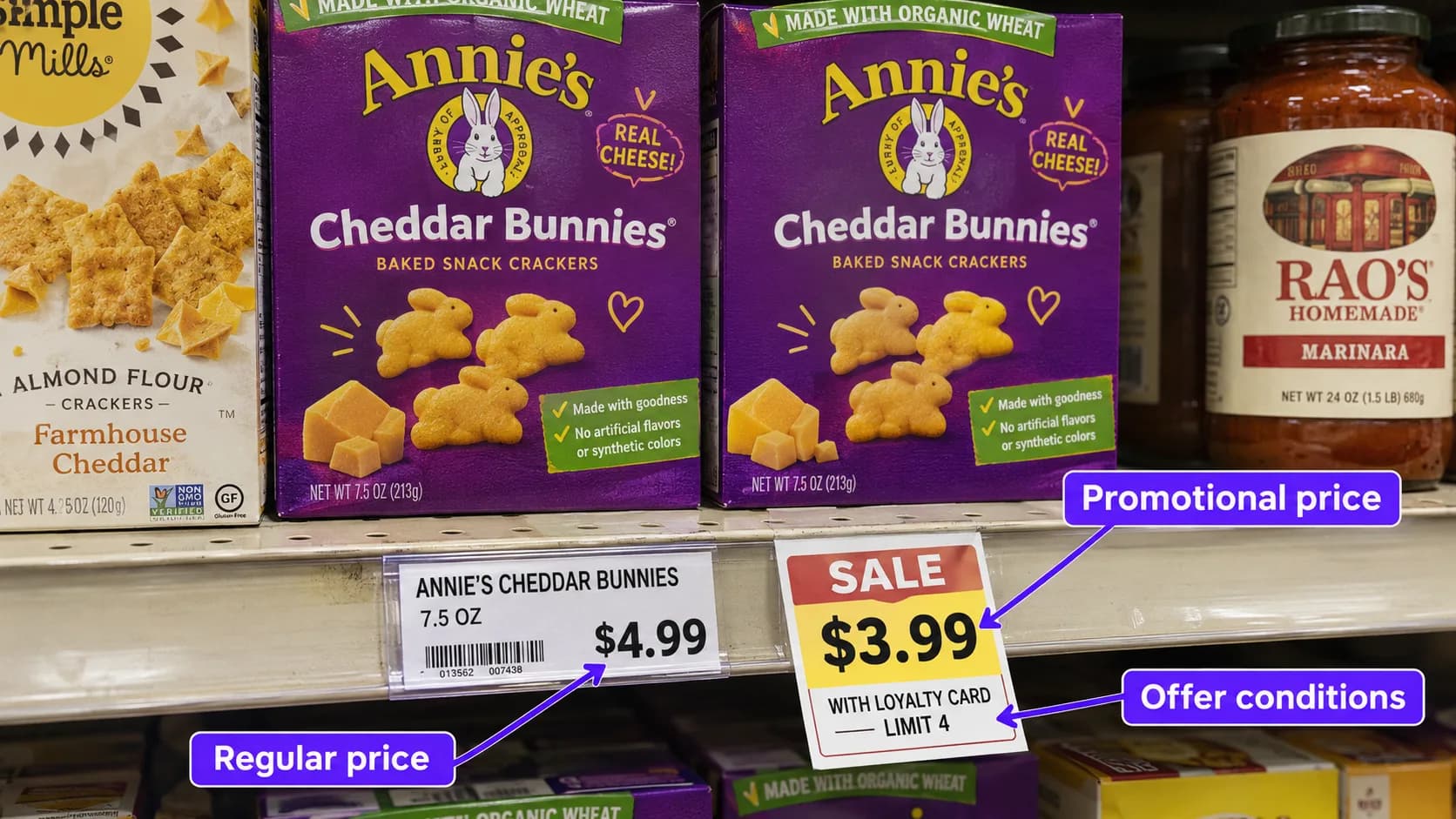
Your team has an expected retail price for a product. A promotion is scheduled, the store list is confirmed, and the campaign is ready.
What price is actually displayed on the shelf?
A retail shelf pricing audit compares the price shoppers see with the applicable price reference for that product and location. It also checks whether the label belongs to the correct SKU and whether promotional conditions are displayed clearly.
For CPG brands, the goal is to replace uncertainty with documented, store-level evidence.
Start by defining what you are checking
A pricing audit can answer different questions. Define the scope before collecting photos.
Check | Comparison | Evidence needed |
|---|---|---|
Shelf price against expected price | Displayed price versus the supplied reference | Correct SKU, readable label, current price reference |
Promotional execution | Displayed offer versus the planned promotion | Promotional sign, dates, eligible products, offer conditions |
Label accuracy | Shelf label versus the product it identifies | Product name, variant, size, and matching identifier |
Shelf-to-checkout accuracy | Displayed price versus the price charged | Shelf evidence plus a separate checkout verification |
A shelf photo does not verify the checkout price. NIST’s price-verification procedure specifically compares advertised or displayed prices with prices charged during checkout. That requires evidence beyond photographing a shelf label. [1]
For a shelf-only assignment, report the displayed price and its relationship to the supplied reference.
1 Prepare an accurate product and price list
A reliable audit starts with an unambiguous brief.
For each product, provide:
Product name and variant.
Package size or pack count.
SKU or UPC identifier.
Product image.
Expected regular shelf price.
Expected promotional price, if applicable.
Promotion dates and eligibility conditions.
Applicable retailers, locations, or pricing zones.
Specify what the reference represents. A suggested retail price is different from a retailer-confirmed promotional price.
If the observed shelf price differs from a suggested price, describe it as a difference from that reference. Do not automatically label it a retailer error.
2 Match the label to the exact product
Before comparing numbers, confirm that the shelf label belongs to the item being audited.
Similar packaging can hide differences in size, flavor, formulation, or pack count. A product can also be placed above a neighboring SKU’s label.
Check the product description and identifiers wherever they are visible. Photograph the product and label together, then take a close-up if the label cannot be read clearly.
If the match remains uncertain, record it as unverified. A readable price attached to the wrong SKU is not reliable pricing evidence.
3 Capture enough evidence to review the finding
A useful pricing photo set should establish three things:
Where the product was displayed. A wider image shows the shelf section and surrounding products.
Which product and label were checked. A closer image connects the item with its shelf label.
What the price and conditions said. A readable close-up captures the displayed price, promotional terms, and relevant dates.
If the same SKU appears on a main shelf and an endcap, check both placements when they are included in the assignment. Different displayed prices should be documented separately.
4 Record regular and promotional prices separately
The largest number on a sign is not always the price available to every shopper.
An offer may require membership, a digital coupon, a minimum quantity, or the purchase of qualifying products. A promotion may also have ended while its signage remains on display.
Record the regular price, promotional price, and conditions as separate fields. Check whether the displayed offer applies to the exact SKU being audited.
For example, “two for a stated price” should not automatically be recorded as the price of one item. The quantity requirement is part of the finding.
5 Classify the result clearly
Use a consistent set of outcomes so reports can be compared across stores.
Result | Meaning |
|---|---|
Match | Observed shelf price equals the applicable expected price |
Above reference | Observed shelf price is higher than the expected price |
Below reference | Observed shelf price is lower than the expected price |
Missing or unreadable label | The displayed price could not be established |
Product-label mismatch | The visible label identifies a different product |
Promotion mismatch | The observed offer or promotional state differs from the supplied campaign requirements |
Unable to verify | The evidence or reference is insufficient for a reliable comparison |
A missing label should never be treated as a price match. Likewise, a product not found during the visit needs its own outcome rather than being assigned an assumed price.
When summarizing results, calculate the match rate using checks with a verified SKU, a readable observed price, and an applicable reference. Report unverified checks separately so missing evidence does not disappear from the results.
6 Make the report useful for follow-up
Each finding should include the store location, visit date, product identifier, expected price, observed price, promotional conditions, and supporting photos.
An illustrative finding could read:
The shelf label matched the audited SKU. The displayed price was above the campaign reference supplied for this location. No promotional sign was visible in the photographed placement.
This explains what was checked without guessing why the difference occurred.
Send the evidence to the appropriate account or retail-operations contact. If a correction is requested, schedule a follow-up check rather than assuming that the shelf label has been updated.
How PlanoIQ supports retail shelf pricing audits
PlanoIQ’s product-check campaigns compare expected and observed shelf prices for specified SKUs and record whether the price matches, is above, or is below the supplied reference. They can also check whether the observed promotional state matches the campaign requirements.
Brands provide the products, expected prices, and product images. Field auditors collect shelf evidence, and human reviewers confirm findings before reports are published.
The resulting store-level reports help teams identify pricing differences, review supporting photos, and follow up with retail partners.
Ready to check the prices displayed alongside your products? Create your PlanoIQ account to claim your first 10 free store visits.