Planogram Compliance: How to Check Whether Your Products Are in the Right Place
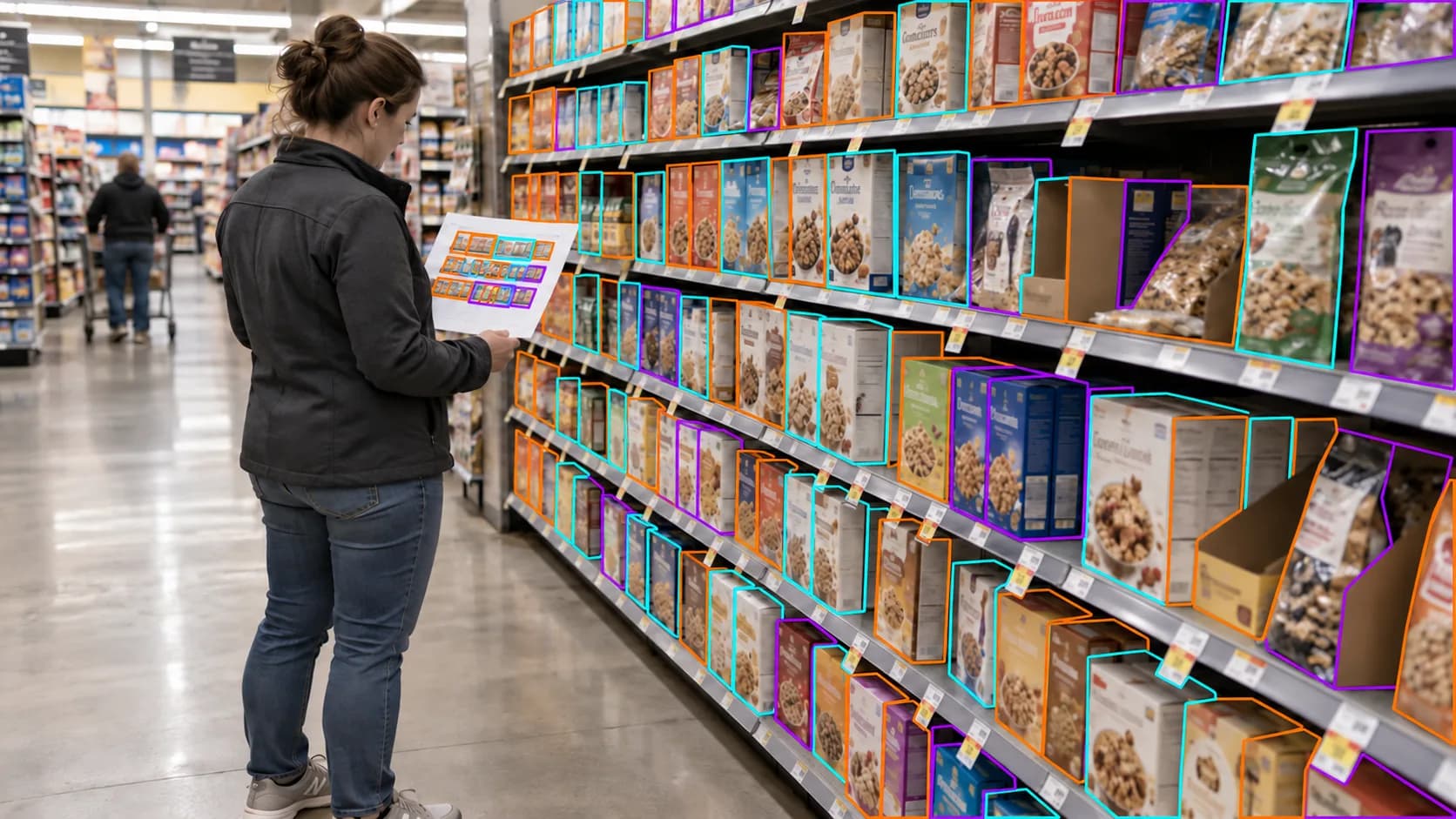
Your products are in the store. But are they on the right shelf, grouped correctly, and given the space that was planned?
Availability is only part of retail execution. A product can be stocked but placed in the wrong section, separated from the rest of the range, or given fewer facings than expected.
Planogram compliance checks help CPG brands compare the shelf shoppers encounter with the intended layout. With the right reference and clear store photos, your team can document differences and bring specific findings to retail partners.
Here’s how to make those checks useful.
What Is Planogram Compliance?
A planogram is a visual guide showing how products should be arranged within a shelf section or display. Depending on its level of detail, it may specify product positions, shelf levels, facings, and the space allocated to different items.
Planogram compliance means checking whether the physical shelf matches the applicable plan.
For a CPG brand, that might mean verifying that:
The expected products and variants are present.
Products occupy the correct shelf positions.
Each item has the planned number of facings.
Variants appear in the intended order or grouping.
Shelf labels correspond to the products above them.
Other products have not occupied the allocated space.
The reference matters. Without an applicable planogram or written placement instructions, an auditor can describe where products are located but cannot reliably confirm whether that placement complies with the plan.
Start With the Correct Planogram
Before scheduling a store check, confirm which layout applies to the location and when it should be in effect.
Stores within the same chain may have different assortments, fixture sizes, or layouts. A smaller location may carry fewer variants than a larger one. A shelf reset may also introduce a new plan that has not yet reached every store.
Your audit brief should include the information needed to make a fair comparison.
Reference detail | Why it matters |
|---|---|
Retailer and store location | Identifies where the plan should apply |
Planogram version and effective date | Helps avoid checking against an outdated or future layout |
Expected products and SKUs | Distinguishes similar sizes, flavors, and variants |
Product images | Helps auditors recognize packaging on the shelf |
Required positions and facings | Defines what the physical arrangement should look like |
Fixture or shelf-section details | Helps identify the correct area to inspect |
Approved exceptions | Accounts for permitted differences at individual stores |
If the retailer has approved a change, include it in the brief. Otherwise, a report may flag a difference that is already authorized.
What to Check on the Shelf
Product Assortment
Start by checking whether the expected products are visible in the relevant section.
Be specific about variants and pack sizes. Finding one product from the brand does not establish that the full expected assortment is present.
When an item cannot be located, record what was inspected and what the evidence shows. An empty labeled slot, a missing shelf label, and a product found elsewhere in the store are different findings.
Also distinguish between a product that is temporarily unavailable and one that the location is not expected to carry.
Shelf Position
Compare each product’s observed position with the supplied reference.
Check the shelf level, position within the section, and relationship to neighboring products. If the plan specifies a particular sequence, verify that sequence rather than simply confirming that all items are somewhere in the fixture.
A useful finding describes the difference precisely:
The expected product was photographed on the bottom shelf. The supplied planogram places it on the second shelf from the top.
That gives the retail partner something specific to investigate.
Number of Facings
A facing is a product front visible to the shopper. If a plan calls for three facings of a particular SKU, the check should establish whether those three positions are being used as intended.
Facings and stock depth are different. Three visible product fronts do not reveal how many units sit behind them. Similarly, one remaining unit does not necessarily mean the product has only one allocated facing.
The report should distinguish between:
The number of product fronts currently visible.
The shelf space or labeled positions apparently allocated to the item.
The number of facings required by the plan.
Where the photo cannot support a reliable count, mark the result as unverified.
Product Grouping and Sequence
Check whether the brand’s products appear together where required and whether variants follow the intended order.
Look for items separated from their group, sizes mixed together, or products placed behind the wrong labels.
These observations should be tied to the reference. A different arrangement is a compliance issue only when it conflicts with the applicable plan or placement instructions.
Space Occupied by Other Products
Photograph any area where another product appears to occupy space allocated to your brand.
The report should show the surrounding shelf, the relevant label, and the competing or misplaced item. This helps distinguish an apparent intrusion into your space from a neighboring product that is correctly positioned.
Avoid assuming why the change happened. The photo can document the arrangement; it may not explain whether it resulted from replenishment, a shopper moving an item, or an approved layout change.
Shelf Labels and Secondary Displays
Check that labels align with the correct products and variants. If pricing verification is included, compare the displayed price with the expected price supplied for the visit.
Inspect secondary placements separately. An endcap, checkout display, and main shelf may each have their own requirements.
A correct promotional display does not establish that the main shelf complies with its plan.
Capture Photos That Support the Comparison
A compliance report needs evidence that someone outside the store can understand.
Begin with a straight-on photo of the full relevant shelf section. Include enough of the fixture to identify shelf levels and neighboring products.
Then capture closer images of any differences, particularly where product names, sizes, or shelf labels need to be read.
Photo type | What it should show |
|---|---|
Full-section photo | The overall arrangement and boundaries of the inspected area |
Product-group photo | The brand’s range, sequence, and visible facings |
Shelf-label close-up | The product identifier and label associated with a finding |
Issue close-up | The specific misplaced item, empty position, or occupied space |
Secondary-display photo | Each additional placement inspected during the visit |
Keep the original photos available alongside annotated versions. Markers should highlight the issue without hiding the product or shelf label that supports it.
If a shopper, cart, or fixture blocks the view, record that limitation rather than treating the hidden area as checked.
Separate Placement Problems From Availability Problems
Planogram compliance and on-shelf availability are related, but they answer different questions.
A product may occupy the correct position while running low. Another may be fully stocked in the wrong place. An empty slot may retain the correct label and allocated space even though no product is available.
Use separate findings so the follow-up addresses the actual condition.
Observation | What it indicates | What to investigate |
|---|---|---|
Empty slot with the expected label | An availability issue at the inspected position | Whether the product needs replenishment |
Product stocked on a different shelf | A potential placement mismatch | Whether the observed position conflicts with the current plan |
Fewer visible fronts than planned | A possible facing or stock issue | Whether space allocation changed or stock has depleted |
Another product in the allocated position | A potential space or placement issue | Whether the placement is authorized |
Expected SKU absent from the entire inspected section | An assortment or availability question | Whether the store should carry it and whether it is elsewhere |
This distinction makes reports more useful than a single pass-or-fail result.
Turn Differences Into Clear Findings
Each finding should connect the expected arrangement with the observed condition.
A practical report includes:
Location and capture date: Where and when the shelf was inspected.
Reference: The planogram version or placement instruction used.
Affected product: The SKU, variant, or product group.
Expected condition: What the reference requires.
Observed condition: What the auditor could verify.
Photo evidence: The image and marked area supporting the finding.
Verification limits: Anything that could not be confirmed.
If you use a compliance score, explain how it is calculated and how unverified items are handled. A score without its underlying checks can hide important differences between stores.
For many teams, a clear list of confirmed mismatches is a more useful starting point than a headline percentage alone.
Check Again After Resets and Corrective Actions
Planogram checks are especially useful after an expected shelf reset, during a new-product rollout, or when investigating a recurring placement concern.
Schedule the visit after the relevant implementation date. A store photographed before its reset deadline should not be assessed as though the new layout were already required.
When a difference is confirmed, share the evidence with the appropriate account or retail contact. Ask whether the placement needs correction or reflects an approved exception.
Then arrange a follow-up check where necessary. A request to correct the shelf is not the same as confirmation that it has changed.
Use comparable photo angles on revisits so your team can review the before-and-after condition more easily.
How PlanoIQ Supports Placement Checks
PlanoIQ helps CPG brands collect shelf evidence without sending their own teams to every location.
Field auditors photograph the relevant shelf sections, AI assists with brand detection and shelf assessment, and a human reviewer confirms or corrects findings before reports are published.
Annotated photos and written assessments can help your team review product placement, facing problems, misplaced products, and competitor encroachment. Separate assessments for multiple placements help keep main-shelf findings distinct from secondary-display findings.
For a planogram-focused campaign, define the comparison requirements in advance and provide the applicable layout, expected products, and placement instructions. The report should make clear which requirements were verified and which need further review.
The goal is to give your team a documented answer to a practical question: does the shelf match the arrangement expected at this location?
Start with 10 free store visits at selected locations carrying your products. Create your PlanoIQ account to claim your visits.