What Is a Shelf Set Audit?
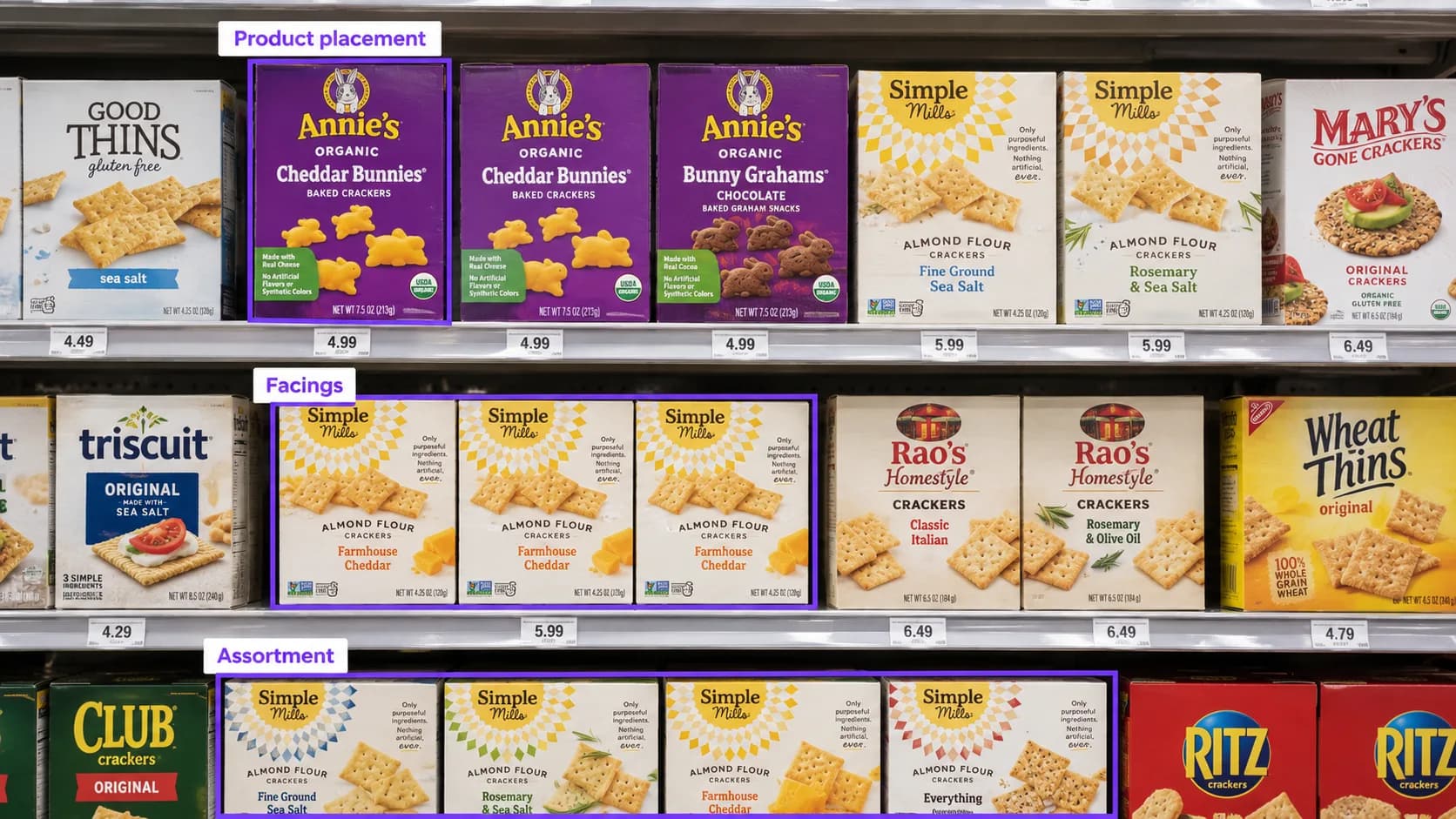
Your products have been approved for a retail chain. The assortment is confirmed, the shelf layout is planned, and stores have been given instructions.
But has that plan made it onto the shelf?
A shelf set audit checks whether a store’s actual product arrangement matches the intended shelf setup. It helps CPG brands verify that the right products are present, positioned correctly, and given the expected space.
For brand managers, category teams, and retail-operations leaders, it connects an approved retail plan with what shoppers can actually see.
What does shelf set mean
A shelf set is the arrangement of products within a retail shelf section. It includes which products belong there, their positions, how they are grouped, and the space allocated to each item.
That arrangement is often documented in a planogram: a visual layout showing how products should be displayed. Assortments and layouts can vary by store format or location, so the reference used for an audit needs to match the store being checked. Retail planning tools similarly support localized assortments rather than assuming every location carries the same products. [1]
A shelf set audit compares that intended arrangement with conditions observed during a store visit.
What should a shelf set audit check
A useful audit looks beyond whether the brand is somewhere in the aisle.
Audit area | What to check | What the finding can reveal |
|---|---|---|
Product assortment | Are the expected SKUs and variants present? | Missing items or an incomplete assortment |
Shelf position | Is each product in its assigned location? | Products on the wrong shelf or in the wrong section |
Facings | Does each SKU have the expected number of visible product fronts? | Differences between planned and observed presentation |
Product grouping | Are related products arranged in the intended order? | Separated variants or disrupted brand blocks |
Allocated space | Is the intended shelf space being used as planned? | Other products occupying the brand’s assigned area |
Labels and signage | Do shelf labels correspond to the products above them? | Missing, misplaced, or mismatched labels |
Availability | Are products available in the audited placement? | Empty positions or visibly low stock |
These checks work together, but they should be recorded separately. A product can be in the correct position and still be out of stock. It can also be fully stocked in the wrong position.
When should brands conduct a shelf set audit
Shelf set audits are particularly useful after a change in retail execution.
After a new retail launch: Confirm that the expected products have reached the shelf and that the initial placement matches the launch plan.
After a category reset: Check whether new positions, assortment changes, and revised space allocations have been implemented.
After adding a SKU: Verify that the new item is displayed in the intended location and has a corresponding shelf label.
Before a retail review: Gather recent evidence to support conversations about assortment, placement, and execution.
After a correction: Revisit a location to check whether a previously documented issue has been resolved.
An initial audit establishes what was observed. Follow-up visits help determine whether an issue was corrected or continues to appear.
How to conduct a shelf set audit
1 Start with the correct reference
Before visiting stores, establish what the shelf should look like.
Provide the applicable planogram or placement instructions, expected SKU list, product images, required facings, and any approved exceptions. Include the relevant store format and the date when the new set should be in place.
Without a reliable reference, an auditor can document shelf conditions, but cannot confidently determine whether the arrangement matches the intended set.
2 Photograph the full section
A close-up can show a product clearly while leaving out the context needed to judge its placement.
Capture the full shelf section, the brand’s product block, readable shelf labels, and close-ups of any issues. Include secondary placements when they are part of the assignment.
The photos should let a reviewer understand both which product is affected and where it sits.
3 Compare expected and observed conditions
Record differences in specific terms.
For example, an illustrative finding might read:
The supplied planogram assigns three facings to this SKU on the second shelf. Two product fronts were visible in that position during the visit.
That description is more useful than “poor shelf execution.” It gives the retail team something concrete to investigate.
4 Separate placement issues from stock issues
Fewer visible facings do not automatically prove that a store reduced the brand’s allocated space. Products may have sold through, shifted, or been pushed behind neighboring items.
Similarly, an empty position does not establish that the product is absent from the entire store.
Record what the evidence supports, and flag anything that needs additional confirmation.
5 Assign follow-up and verify the result
Each finding should identify the store, affected SKU, observed condition, supporting photo, and next action.
A missing product may require a replenishment check. An incorrect position may require a merchandising correction. A missing label may need a separate request to the retail partner.
An audit documents the issue; a follow-up check confirms whether the shelf has changed.
How PlanoIQ supports shelf set audits
PlanoIQ helps CPG brands collect store-level shelf evidence without sending their own teams to every location.
Brands identify the stores and products to check and provide the relevant placement requirements. Field auditors photograph the shelf sections, AI assists with product identification and shelf-condition checks, and a human reviewer confirms findings before publication.
Annotated photos and written assessments give brand teams evidence they can review and share with retail partners. Where planogram compliance is part of the assignment, the applicable layout provides the reference for comparing expected and observed placement.
Want to see how your products are presented in stores? Create your PlanoIQ account to claim your first 10 free store visits.