What Should a Retail Shelf Audit Report Include?
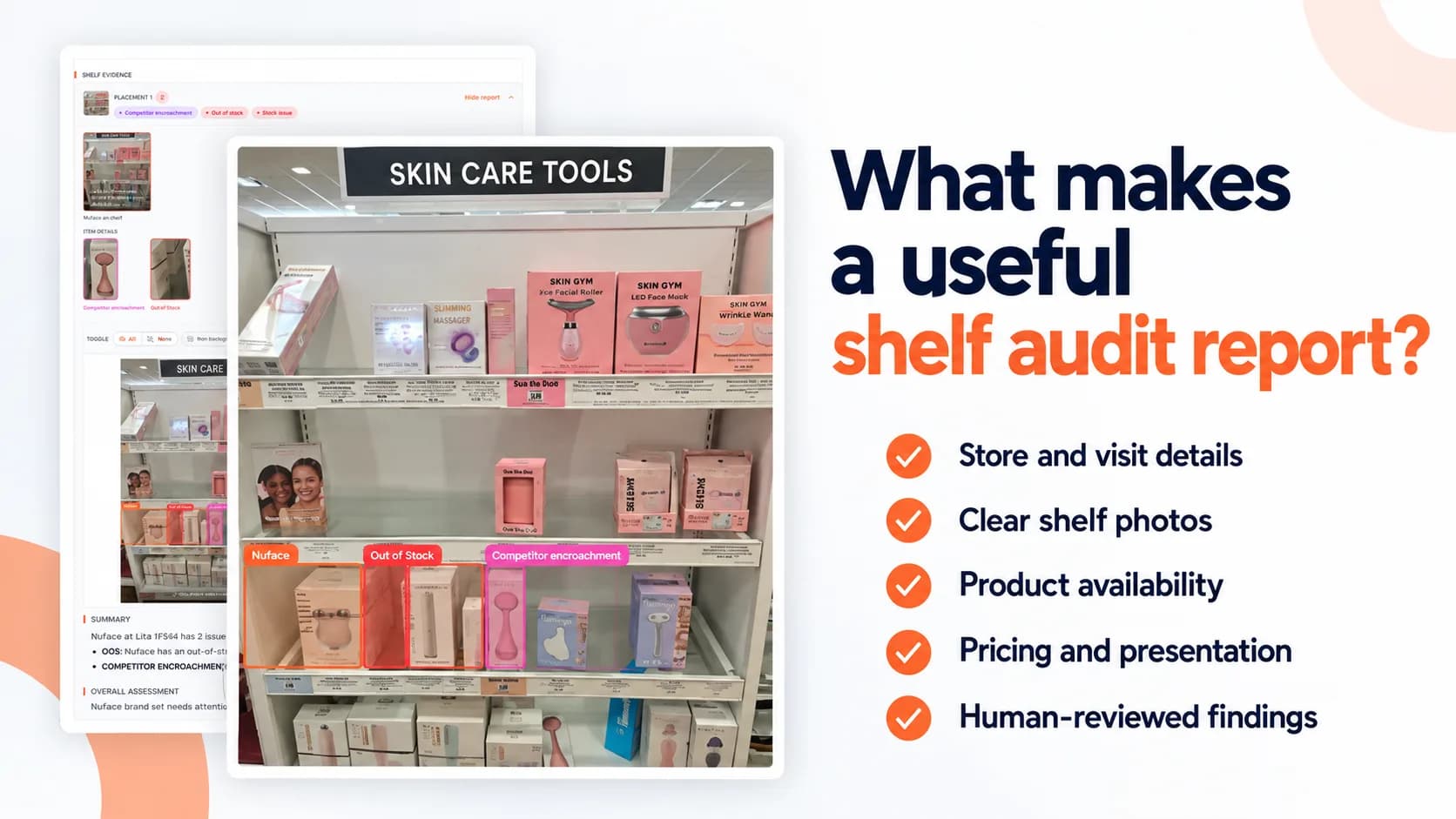
A report says your product is out of stock. But which variant is missing? Where was it supposed to be? When was the shelf checked—and is there a photo your retail partner can use to investigate?
Those details determine whether a shelf audit leads to a useful follow-up or another round of questions.
For CPG brands, a retail shelf audit report should connect each finding to a specific store, product, visit, and piece of evidence. It should make the condition clear, explain what was checked, and help your team decide what needs attention.
Here’s what to look for in a report—and what to include in your audit brief so you get useful results.
1. Store Details and the Visit Date
Every report should make it easy to identify where and when the audit took place.
At a minimum, include:
Retail chain and store address.
Store number or location identifier, where available.
Visit date and capture time.
Brand and products included in the check.
Shelf sections and secondary placements inspected.
A chain name and city alone may not identify the right location. Similarly, a publication date should not be confused with the date the auditor photographed the shelf.
These details matter when sharing findings with account managers or retail partners. They also help your team judge whether the evidence is recent enough for the question you are investigating.
2. A Clear Audit Scope
Readers should understand what the auditor was asked to check before interpreting the results.
Was the visit focused on product availability? Did it include pricing, promotional signage, or a secondary display? Were all expected variants checked, or only selected products?
The report should distinguish between an area that was checked and found satisfactory, an area that could not be verified, and an area that was outside the scope.
Audit element | Reference information needed |
|---|---|
Product availability | Expected products and variants for the location |
Shelf placement | Expected section, placement instructions, or planogram |
Pricing | Product identifiers and expected prices |
Promotional execution | Campaign dates, offer details, and expected signage or displays |
Secondary placements | Endcaps, checkout displays, or other placements to inspect |
Without those references, an auditor can document what is visible but may not be able to determine whether it matches the intended execution.
3. Shelf Photos That Show Context and Detail
Photos should help someone who was not in the store understand the finding.
A close-up of an empty space may be useful, but it needs enough context to show which product belongs there. A wide aisle photo may establish the location while leaving labels too small to read.
A useful report combines:
Context photos: Show the shelf section and surrounding products.
Detail photos: Show relevant products, shelf labels, prices, or signage.
Annotated photos: Mark the specific area associated with a finding.
Annotations should point to the evidence without covering it. A rectangle around a gap is more useful when the underlying shelf label remains visible.
Your team should also be able to inspect the original photo. This allows reviewers and retail partners to check details beyond the marked area.
4. Product Availability Findings
Availability should be reported clearly enough to distinguish different shelf conditions.
“Product missing” is often too vague. It could mean an empty slot for an expected item, a variant that could not be located, or a brand that the store does not carry.
Finding | What the report should explain |
|---|---|
Product visible | Which expected products were observed in the inspected area |
Low stock | What visible gaps or limited front-row stock support the finding |
Out of stock | Which expected item has an empty shelf position and what evidence identifies it |
Not found | What areas were inspected and what could not be located |
Not carried at the location | What assortment information or other confirmation supports that conclusion |
A product not being found during a visit does not, by itself, prove that the store does not carry it.
The report should also avoid presenting a shelf photo as a complete inventory count. Visible shelf availability and total store inventory are different measures.
5. Presentation and Placement
A product can be available and still be difficult for shoppers to notice or identify.
The report should document visible presentation problems such as:
Turned, leaning, or untidy products.
Products placed in the wrong section.
Competitor products occupying the expected space.
Visibly damaged packaging.
Poorly organized product blocks.
Each finding should identify the affected product or area and include supporting evidence.
If the report claims that placement does not comply with a planogram, it should reference the planogram or placement instructions used for the comparison. Without that reference, describe the observed position rather than claiming a confirmed compliance failure.
6. Pricing and Shelf Labels
A pricing check needs a reliable connection between the product, its shelf label, and the expected price.
The report should identify:
The product or SKU being checked.
The observed shelf price.
The expected price supplied for the audit.
Whether the observed price matches, exceeds, or falls below that reference.
Whether a promotional price or sale label is present.
Any uncertainty about which product a label belongs to.
An unreadable label should be recorded as unverified, rather than treated as a match or mismatch.
Keep shelf-price checks separate from checkout-price verification. A photograph documents the displayed price; it does not establish what the register would charge unless the visit includes a separate checkout check.
7. Promotional Execution
Promotional checks should compare what is visible in the store with what was expected during the campaign.
Depending on the brief, this may include promotional signage, a temporary price reduction, an endcap, or another secondary display.
A useful report answers three questions:
Was the expected promotional element present?
Did the visible offer match the supplied campaign details?
Were the relevant products visible in that placement?
The capture date matters here. A visit after the campaign ends cannot establish whether signage was present during the promotion.
Main shelves and promotional displays should also be assessed separately. A stocked endcap does not necessarily mean the regular shelf is stocked, and an empty display does not describe every placement in the store.
8. A Prioritized Findings Summary
Your team should be able to understand the main findings without searching through every photo.
A summary should identify the issue, the affected product or placement, and the supporting evidence. It can also suggest a practical next step, while keeping that recommendation separate from the observation.
For example:
Report field | What it should contain |
|---|---|
Finding | A specific description of the observed condition |
Product or placement | The affected SKU, variant, shelf section, or display |
Evidence | A linked photo and marked area |
Priority | The level of attention needed under a defined rubric |
Suggested follow-up | A reasonable action for the account or retail team |
Avoid explanations that the evidence cannot support. “Empty slot observed” is an observation. “The store failed to replenish from the backroom” is a conclusion that requires additional verification.
9. An Overall Assessment With a Defined Rubric
A grade or status can help your team scan multiple reports, but readers need to know what it means.
If reports use letter grades, scores, or labels such as “needs attention,” include a clear definition. Apply the same rubric consistently across comparable visits.
The assessment should help readers understand:
Which findings affected the result.
Whether different placements received separate assessments.
Whether anything important could not be verified.
Whether the result describes shelf condition or a distribution status.
For example, a location that does not carry the brand should remain distinguishable from one that carries it but has an empty shelf.
A summary grade is a navigation aid. Your team should still be able to inspect the findings behind it.
10. Review Status and Auditor Notes
Reports should make it clear whether findings have been reviewed and confirmed.
AI can help identify products and assess shelf images, but unclear labels, similar packaging, and partially visible products can introduce uncertainty. Human review provides an opportunity to check whether the evidence supports each finding.
Auditor notes add context that may not be obvious from a photo. Keep those notes separate from the report’s interpretation, and attribute any information provided by store staff.
For example, a staff member’s explanation about an expected delivery should be recorded as a statement from that person—not as something established by the shelf image.
11. A Way to Track Follow-Up
The report should give your team enough information to route an issue to the right person and revisit it later.
That means using consistent store identifiers, product references, and issue categories across visits. When follow-up information is available, connect the original finding with the action taken and any subsequent check.
Keep the stages distinct:
Issue reported: The condition was documented.
Action requested: Someone was asked to investigate or correct it.
Resolution verified: A later check confirmed that the visible condition had changed.
Sending a report does not establish that the issue has been fixed.
A Quick Checklist for Reviewing Your Reports
Before accepting a retail shelf audit report, ask:
Can we identify the exact store and visit date?
Is it clear which products and placements were checked?
Does each important finding have usable photo evidence?
Are observations separated from assumptions?
Are missing products distinguished from products the location does not carry?
Do pricing and promotional checks use the correct references?
Are unverified items clearly marked?
Can we understand and share the report without additional explanation?
Is there enough detail to arrange a meaningful follow-up?
If those questions are difficult to answer, the report may need more context before your team can act on it.
What PlanoIQ Reports Include
PlanoIQ combines store visits, AI-assisted shelf assessment, and human review to provide CPG brands with documented shelf findings.
Reports include store metadata, annotated shelf photos, issue markers, and written assessments. Structured sections cover the visit summary, on-shelf availability, presentation, pricing and signage, promotional execution, findings, and auditor notes, according to the visit scope.
Where multiple placements are inspected, each can receive its own assessment. Product-check campaigns can also compare observed shelf prices with the expected prices supplied for the audit.
A human reviewer confirms or corrects findings before the report is published. Your team receives an interactive web report, with an optional PDF, that can support internal review and conversations with retail partners.
See what a documented store check can reveal about your products. Create your PlanoIQ account to claim your first 10 free store visits.